
A closed-lost deal tells you the outcome, but not necessarily the reason. Sales representatives may leave the reason blank, choose a generic value, or remember only the final conversation instead of the full history. Over time, that creates unreliable reporting and makes it harder to understand why opportunities are being lost.
This HubSpot workflow uses custom code and AI to review the latest customer-facing activity on a deal and assign one primary closed-lost reason using the BANT framework: Budget, Authority, Need, Timing, or Other.
For example, if recent emails show that the prospect liked the solution but postponed the project until the next fiscal year, the workflow can classify the loss as Timing instead of relying on a salesperson to update the record manually.
The Workflow
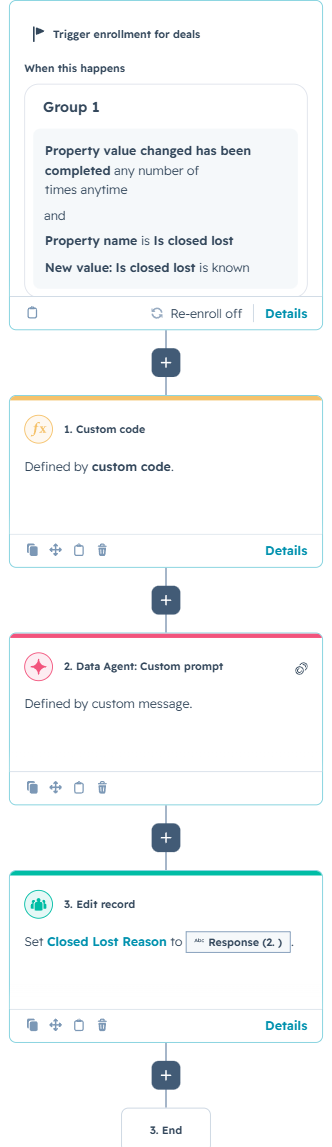
1. Enroll the deal when it becomes closed lost
The workflow is deal-based and enrolls when the Is closed lost property becomes known. This ensures the analysis runs after HubSpot recognizes the deal as lost, while the relevant activity is still available on the record.
Re-enrollment is disabled in this example because the workflow is intended to classify the loss once. A business that allows deals to reopen and close again could adjust this behavior, but it should also decide whether the previous reason should be overwritten or preserved for historical reporting.
2. Collect the deal’s recent customer-facing activity
The first action is a custom-coded step that retrieves engagements associated with the deal. It gathers emails, calls, notes, and meetings, while intentionally excluding tasks because tasks often contain internal reminders rather than evidence of why the prospect decided not to move forward.
The code strips HTML from engagement content, converts each interaction into a readable line, sorts everything chronologically, and keeps only the five most recent interactions. Limiting the activity window gives the AI enough context to identify the likely reason without sending an unnecessarily large or outdated conversation history.
How the Custom Logic Works
The excerpt below shows the core collection and formatting logic. Authentication, API error handling, and the complete engagement loop are summarized to keep the article readable.
The output of this action is a single activity field containing the cleaned timeline. That output becomes the input for the Data Agent in the next step.
3. Classify the loss with a strict AI prompt
The Data Agent is instructed to analyze only what is present in the activity log. It must choose exactly one BANT-based reason and return no explanation. This strict output format is important because the workflow uses the response directly to update a HubSpot property.
You are analyzing why a B2B deal was LOST. Below is the deal's
activity log (emails, calls, notes, meetings). Based ONLY on what
actually happened in the activity, pick the single primary reason
the deal was lost, using the BANT framework.
Respond with EXACTLY ONE of these values, and nothing else:
Budget | Authority | Need | Timing | Other
- Budget: price/cost was the blocker; no funds; too expensive.
- Authority: contact wasn't the decision-maker; no internal buy-in.
- Need: product didn't fit a real need; no genuine problem.
- Timing: wrong time; "not now"; project delayed; revisit later.
- Other: none of the above clearly applies.
Activity log:
Answer with one value only, no explanation.
Using “Other” as a controlled fallback prevents the AI from forcing a BANT classification when the activity does not clearly support one. The instruction to use only the recorded activity also reduces the risk of the model inventing a reason based on assumptions.
4. Update the Closed Lost Reason property
The final action writes the Data Agent response into the deal’s Closed Lost Reason property. Once stored as structured CRM data, the result can be used in reports, dashboards, lists, pipeline reviews, and coaching workflows.
The workflow can be customized by expanding the classification list with business-specific reasons such as Competitor, No Response, Product Gap, Procurement, or Legal Review. The activity window can also be shortened to three interactions for faster processing or expanded when longer sales cycles require more context.
Use Cases
1. Reliable win-loss reporting
Sales leaders can measure how many deals are lost because of price, timing, authority, or lack of need without depending on inconsistent manual entry. Trends can be compared by pipeline, team, owner, industry, or deal size.
2. Sales coaching and process improvement
If Authority appears frequently, the team may need stronger multithreading and stakeholder discovery. If Timing is the dominant reason, nurture processes and future follow-up dates may need improvement. The workflow turns individual losses into patterns that can guide coaching.
3. Automated follow-up after a loss
Each reason can trigger a different next step. Timing losses could create a future task, Budget losses could enter a lower-cost nurture campaign, and Authority losses could prompt the owner to identify additional decision-makers.
Wrapping Up
This workflow transforms closed-lost activity into structured, reportable insight. Custom code gathers the latest customer-facing evidence, AI identifies the most likely primary reason, and HubSpot records the result automatically.
No Bounds Digital helps businesses design AI-powered HubSpot workflows, build custom-coded actions, connect external data sources, and turn manual campaign decisions into reliable automation. Contact No Bounds Digital to discuss AI services or custom HubSpot development for your next workflow.