
Weather can influence customer behavior, but most marketing teams still treat it as a manual campaign input. Someone checks the forecast, decides whether conditions are relevant, and then launches an email—often too late for the message to feel timely. This HubSpot workflow turns that process into a repeatable automation.
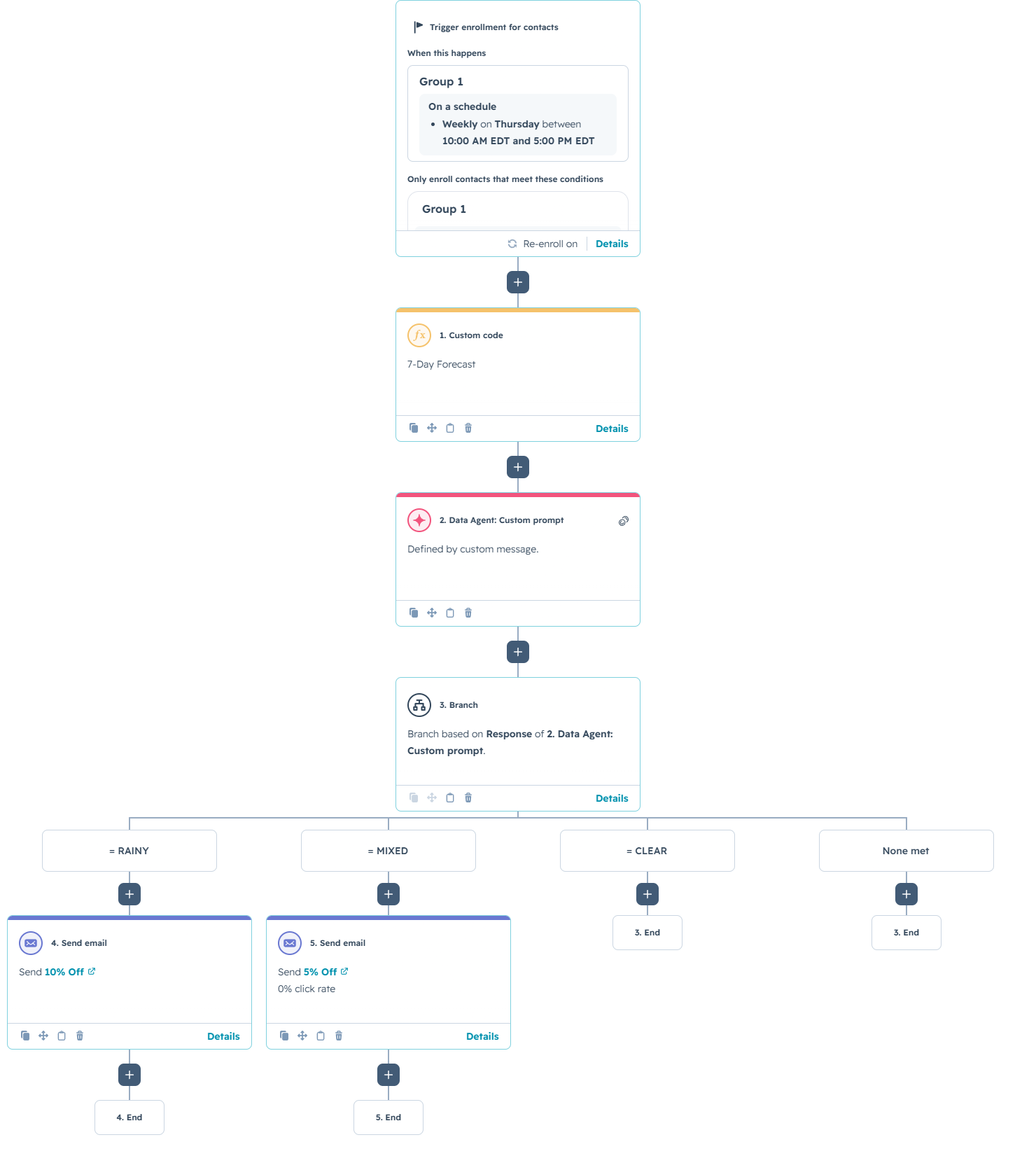
Each week, the workflow retrieves a seven-day forecast, isolates Friday through Sunday, asks HubSpot’s Data Agent to judge the weekend as rainy, mixed, or clear, and then sends the appropriate promotional email. In the example shown here, a rainy weekend triggers a 10% discount, a mixed weekend triggers a 5% discount, and a clear weekend ends the workflow without sending anything.
A practical use case would be a local entertainment venue, indoor attraction, retailer, or hospitality business that sees higher demand when customers are more likely to stay inside. Instead of sending the same promotion every week, the business adjusts the offer based on real conditions.
The Workflow
1. Weekly enrollment
The workflow is contact-based and runs on a weekly schedule every Thursday. Running on Thursday gives the system enough time to evaluate the upcoming weekend and deliver a promotion before customers make Friday, Saturday, or Sunday plans.
Enrollment criteria can limit the workflow to subscribed contacts in a relevant region, active customers, or loyalty members. Re-enrollment allows eligible contacts to be evaluated again each week.
2. Retrieve the seven-day forecast
The first action is a HubSpot custom code step named “7-Day Forecast.” It calls a weather API using the latitude and longitude for Lancaster, Pennsylvania, and requests daily weather conditions, high and low temperatures, precipitation probability, and expected precipitation totals.
The code identifies the upcoming Friday, Saturday, and Sunday, converts weather codes into readable conditions, and creates a concise summary for the AI action. It also returns the weekend start date and weather-check timestamp.
How the Custom Logic Works
The excerpt below shows the core of the workflow logic. Supporting functions for API error handling and weather-code translation are intentionally summarized rather than reproduced in full.
3. Let the Data Agent judge the weekend
The custom code does not make the promotional decision itself. Instead, it produces structured weather data and passes it to a Data Agent custom prompt. The prompt evaluates the weekend as a whole, which is important because a small amount of rain on one day should not automatically trigger the strongest offer.
You are helping a business decide whether to send a "rainy weekend" promotional email. Below is the day-by-day forecast for this Friday, Saturday, and Sunday. Forecast: Judge the weekend as a whole for someone deciding whether to stay in. Consider how much rain falls, how it's spread across the three days, and whether it's light and brief or heavy and sustained. A trace of rain spread thinly (e.g. 0.05 in per day) is NOT a washout. Rain concentrated on one day while the others are clear is only a partial washout. Return exactly one of these three verdicts, and nothing else: - RAINY — most of the weekend is meaningfully wet; a strong reason to stay in. - MIXED — one wet day but otherwise okay; a light nudge is warranted. - CLEAR — mostly dry or only trivial rain; do not send.
Requiring one exact verdict keeps the next branch reliable. The workflow does not need to interpret a paragraph of AI-generated text; it only checks whether the response equals RAINY, MIXED, or CLEAR.
4. Branch and send the appropriate offer
The workflow branches based on the Data Agent response. Contacts in the RAINY branch receive a 10% discount email. Contacts in the MIXED branch receive a smaller 5% offer. CLEAR and unmatched responses end without sending an email. This protects the business from discounting when the forecast does not justify it.
The structure can be customized by making the forecast location dynamic through contact or company properties. The verdict can also evaluate snow, extreme heat, air quality, or cold temperatures instead of rain alone.
Use Cases
1. Indoor entertainment and attractions
Bowling centers, museums, escape rooms, theaters, and family entertainment venues can promote indoor activities when poor weather makes outdoor plans less attractive. The offer can be stronger when the entire weekend is wet and lighter when only one day is affected.
2. Retail and ecommerce promotions
Retailers can connect forecast conditions with product categories and campaign timing. Rainy weekends could trigger offers for home entertainment, comfort products, delivery, or online shopping, while clear conditions could suppress the campaign entirely.
3. Service businesses with weather-sensitive demand
Restaurants, delivery services, fitness studios, and hospitality businesses can use the same framework to anticipate demand. The AI layer converts several weather variables into one operational decision without manual review.
Wrapping Up
This workflow combines external data, custom code, AI classification, branching, and email automation in one practical HubSpot process. The custom code gathers and formats the forecast, the Data Agent applies business judgment, and the workflow sends only the promotion that matches the expected conditions.
No Bounds Digital helps businesses design AI-powered HubSpot workflows, build custom-coded actions, connect external data sources, and turn manual campaign decisions into reliable automation. Contact No Bounds Digital to discuss AI services or custom HubSpot development for your next workflow.