
Incomplete contact records create small problems that quickly become larger ones. Missing names make emails feel impersonal, missing company information weakens segmentation, and sales teams often spend time researching details that could have been captured automatically.
This HubSpot workflow uses a Data Agent custom prompt to infer a contact’s first name, last name, and company name from the email address already stored on the record. It then checks each CRM property individually and fills only the fields that are still blank. Existing values are preserved instead of being overwritten.
For example, an address such as jane.smith@northstarconsulting.com may provide enough information to infer Jane as the first name, Smith as the last name, and Northstar Consulting as the company. By contrast, an address on a personal provider such as Gmail should not be used to guess a company name.
The Workflow
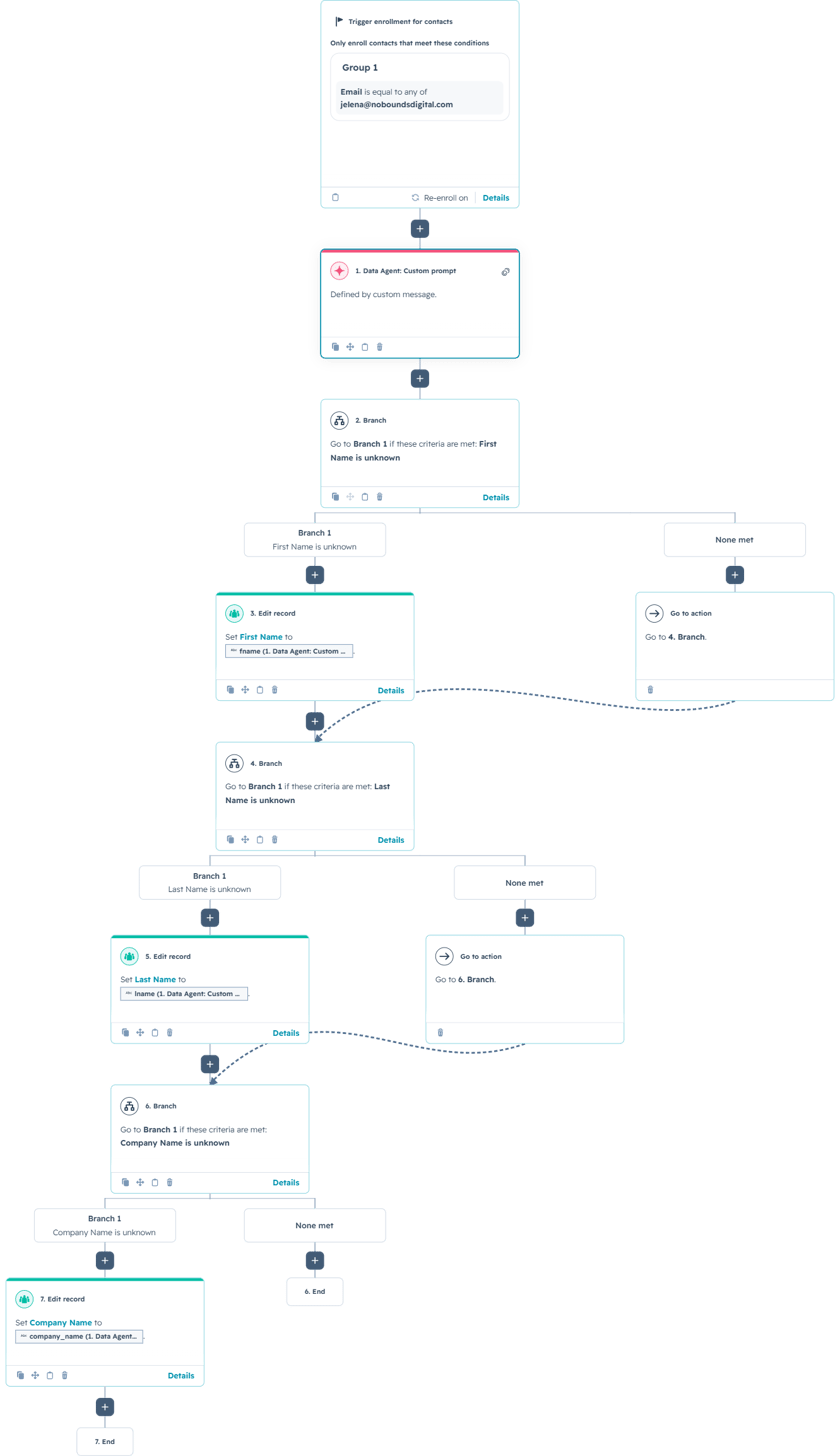
1. Enroll contacts that need enrichment
The workflow shown in the demo enrolls a specific contact for testing. In a production portal, the trigger would typically require the Email property to be known and at least one enrichment field—First Name, Last Name, or Company Name—to be unknown.
That enrollment design keeps the workflow focused on incomplete records. Re-enrollment can be enabled when an email address changes, but it should be configured carefully so the workflow does not repeatedly process records that already contain reliable information.
2. Infer contact details with a Data Agent custom prompt
The Data Agent receives only the contact’s email address. The prompt explains common email naming patterns, distinguishes business domains from personal providers, and tells the model to leave uncertain values blank rather than guessing.
The output format is intentionally simple. The workflow receives three labeled lines—fname, lname, and company_name—which can then be mapped into HubSpot properties.
You are a data extraction assistant. Your job is to infer a contact’s **first name**, **last name**, and **company name** using **only the email address** provided.
### Input
Email address: ``
### Instructions
1. Analyze the email address and attempt to infer:
* **First name**
* **Last name**
* **Company name**
2. Use the email’s **local part** (before the `@`) to infer names when possible.
* Examples of patterns:
* `firstname.lastname@domain.com`
* `first.last@domain.com`
* `firstname@domain.com`
* `f.lastname@domain.com`
* `firstl@domain.com`
* `firstname_lastname@domain.com`
3. Use the **domain** (after the `@`) to infer the company name **only when it appears to be a business domain**.
* If the domain is a **free/personal provider**, do **not** infer company name.
* Treat these as personal providers (not limited to): gmail.com, yahoo.com, outlook.com, hotmail.com, icloud.com, aol.com, proton.me, protonmail.com, live.com, msn.com
4. Only fill values you are confident about.
* If you cannot confidently determine a value, leave it **blank**.
* Do **not** guess.
5. Output format must be **exactly** the following, with no extra text:
```
fname:
lname:
company_name:
```
### Output rules (critical)
* If you cannot determine a field, output **nothing after the colon** (leave it blank).
* Do not include explanations, confidence scores, notes, punctuation, or additional fields.
* Do not output “unknown”, “n/a”, “null”, or placeholder values.
-Format the company name as a proper, capitalized business name
3. Protect existing CRM data with property checks
After the Data Agent runs, the workflow checks whether First Name is unknown. If it is blank, HubSpot updates the property using the extracted fname value. If First Name already exists, the record skips that update and continues to the next check.
The same pattern is repeated for Last Name and Company Name. These branches are an important safeguard because an inferred value should not replace information that a contact, salesperson, or previous integration already supplied. The workflow enriches gaps rather than rewriting trusted CRM data.
4. Handle uncertain and personal email addresses safely
Not every email address contains enough information to support enrichment. Addresses such as info@company.com, sales@company.com, or an abbreviated username may not reveal a reliable person’s name. In those situations, the prompt is instructed to return a blank value.
Company inference is also restricted. A custom business domain may support a reasonable company name, while Gmail, Outlook, Yahoo, and similar providers should leave the company field empty. This prevents personal email domains from being stored as company names.
The workflow can be customized by adding more personal email providers, excluding generic inbox prefixes, or returning an additional confidence field. A review branch could then handle uncertain records instead of updating them automatically.
Use Cases
1. Form and inbound lead cleanup
Some forms request only an email address to reduce friction. This workflow can enrich new contacts after submission so sales and marketing teams have more usable records without adding extra required form fields.
2. Legacy database enrichment
Imported contacts often contain email addresses but incomplete names or company information. The workflow can process those records in controlled batches and fill only missing properties.
3. Better personalization and routing
Once a first name and company are available, HubSpot can support more personal emails, company-based segmentation, account matching, owner assignment, and cleaner reporting. Even limited enrichment can improve the quality of later automation.
Wrapping Up
This workflow turns an email address into a practical enrichment signal while protecting existing CRM data. The Data Agent extracts only values it can infer confidently, and HubSpot branches ensure that only blank fields are updated.
No Bounds Digital helps businesses design AI-powered lead routing, create reliable custom prompts, and build advanced HubSpot workflows that connect every inquiry with the right team. Contact No Bounds Digital to discuss AI services or custom development in HubSpot.