
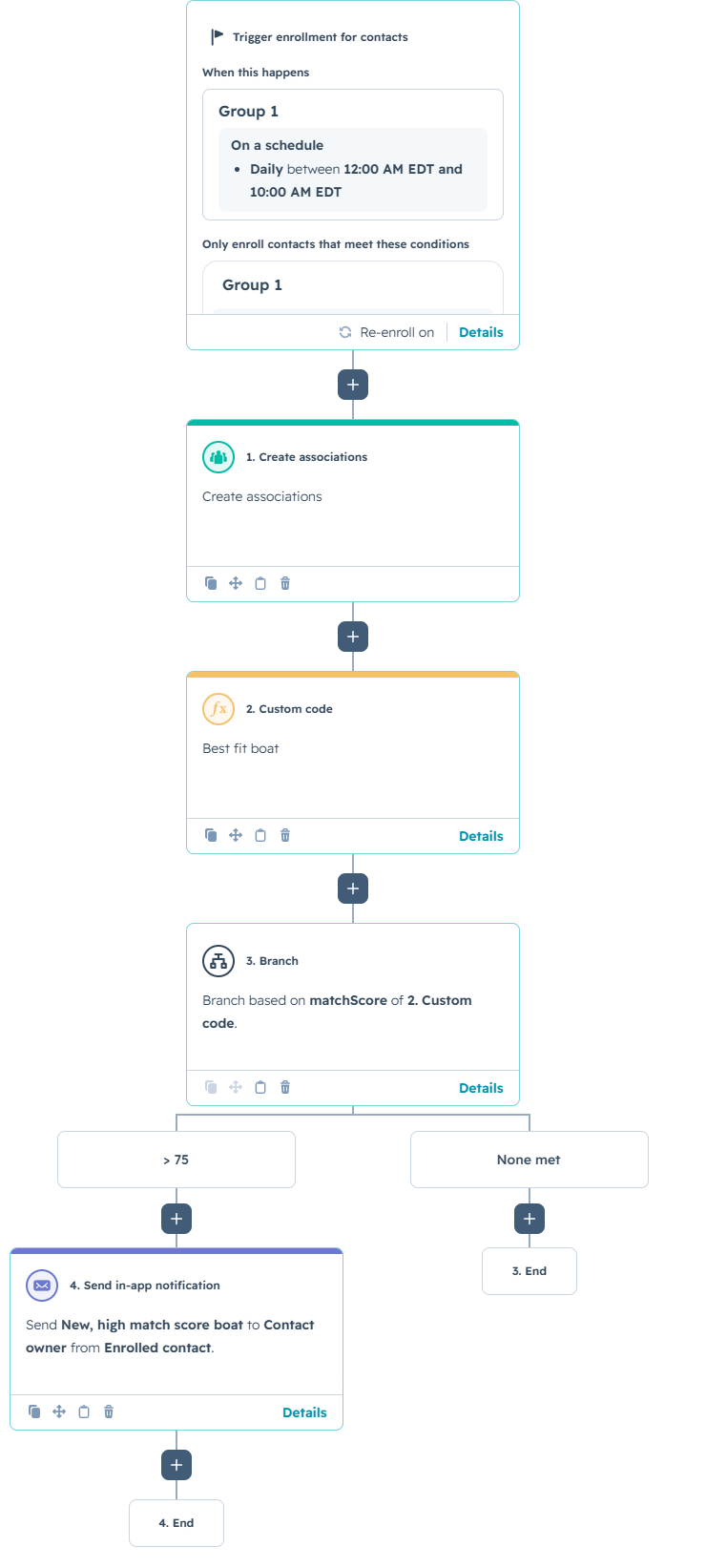
This HubSpot workflow turns buyer preferences into an actionable inventory recommendation. It runs on a schedule, associates eligible Boat records with each enrolled contact, evaluates those records with a custom-coded scoring model, and alerts the contact owner when the strongest match exceeds the workflow's threshold.
For example, a prospective buyer may want a center-console boat from a preferred manufacturer, approximately 30 feet long, with a budget of $250,000. Instead of asking a sales representative to compare every available record manually, the workflow evaluates the associated boats and identifies the option that most closely matches the contact's stated needs.
The Workflow
Enrollment and Candidate Associations
The contact-based workflow is scheduled to run daily between 12:00 a.m. and 10:00 a.m. EDT. Only contacts that satisfy the workflow's configured enrollment conditions proceed. The screenshot does not show those conditions, but a practical setup could require the contact to have at least one completed preference field, such as desired boat type, length, make, or budget.
The first action, Create associations, connects the enrolled contact with the Boat records that should be considered. This step is important because the custom code does not search every Boat record in the portal. It retrieves the boats already associated with that contact and treats them as the candidate pool. The precise association rules are not visible in the screenshot, so they should be documented alongside the workflow—for example, whether boats are associated by availability, location, inventory status, or another eligibility rule.
The Custom-Coded Matching Action
The Best fit boat custom code reads four contact preferences: make_wanted, length_wanted, boat_type_wanted, and budget_wanted. It then retrieves every associated Boat ID through HubSpot's v4 associations endpoint, follows pagination when necessary, and batch-reads the Boat properties used in the comparison: boat type, length, make, and price.
Each boat receives a weighted score. Boat type contributes up to 40 points, budget up to 30, length up to 20, and make up to 10. This weighting makes the requested category and affordability more influential than brand preference. The code also normalizes the result when a contact leaves a preference blank, preventing an incomplete profile from being penalized for criteria that were never provided.
Budget is treated as both a scoring factor and an eligibility control. A boat within budget receives all 30 budget points. A boat up to 5% over budget receives 15 points, while one between 5% and 10% over receives five. Boats more than 10% over budget are normally disqualified. However, if every associated boat is over the limit, the code still returns the closest available option rather than producing no recommendation.
Length is scored according to the distance from the requested measurement. An exact match receives 20 points, with progressively fewer points assigned as the difference grows. Categorical comparisons for boat type and make are normalized for casing and spacing, and the contact fields can contain multiple selected values.
After scoring, the code sorts candidates by normalized score. Ties are resolved by lower percentage over budget, smaller length difference, an exact make match, lower price, and finally the lower HubSpot record ID. It returns the winning Boat ID, a score from zero to 100, a classification, a human-readable explanation, a score breakdown, the number of boats evaluated, and key details about the selected boat.
Branching and Owner Notification
The workflow branches on the matchScore output. When the score is greater than 75, HubSpot sends an in-app notification to the enrolled contact's owner. Records that do not meet the threshold exit without a notification. Because the code labels scores of 70 to 84 as Good match, the workflow's greater-than-75 branch intentionally alerts owners only for the stronger portion of that category and all Excellent matches.
Two useful customizations are straightforward. First, the scoring weights and branch threshold can be adjusted to fit the sales strategy. A premium dealership might prioritize make and model, while a price-sensitive operation might increase the budget weight. Second, the code can include additional Boat properties such as new or used status, location, engine type, availability date, or inventory age. It could also return the top three matches instead of only one, giving the representative alternatives for the first conversation.
How the Custom Logic Works
The excerpt below focuses on the scoring, candidate selection, and workflow outputs. Supporting API retrieval, pagination, normalization, and error-handling functions are not included.
Use Cases
1. Faster Response to High-Intent Buyers
When a contact submits detailed preferences, the workflow can immediately identify a strong inventory match and place it in front of the record owner. The representative begins the conversation with a relevant recommendation instead of spending time searching the CRM, reducing response time and improving the buyer experience.
2. Automated Re-Engagement as Inventory Changes
Because the workflow runs daily, contacts can be reassessed after new inventory is added or associations are updated. A buyer who had no compelling option yesterday may become a strong match today. The owner notification creates a timely reason to reconnect without requiring the sales team to monitor every inventory change manually.
3. Reusable Matching for Other Custom Objects
The same architecture can support many high-value HubSpot use cases. A real estate company could match buyers to properties, a school could match prospects to programs, a recruiter could match candidates to jobs, or a service business could match customers to packages. The properties, weights, and eligibility rules change, but the pattern remains the same: associate candidates, score them, select the best result, and route the next action.
Wrapping Up
This workflow combines HubSpot associations, custom objects, programmable automation, and owner notifications to turn stored CRM data into a practical recommendation. Its value comes from making the matching logic consistent, explainable, and available at scale—without asking a team member to compare records one by one.
No Bounds Digital helps organizations design AI-powered HubSpot workflows, custom-coded actions, custom object solutions, and CRM automation tailored to real operating processes. Contact No Bounds Digital to explore how custom development and AI services can turn your HubSpot data into faster, more intelligent action.