
If you're looking for an easy way to create a website without any coding required, look no further than HubSpot's drag-and-drop website builder. With this tool, you can choose from a library of templates and designs, or you can create your own custom design. Plus, you can add features and functionality to your website with just a few clicks.
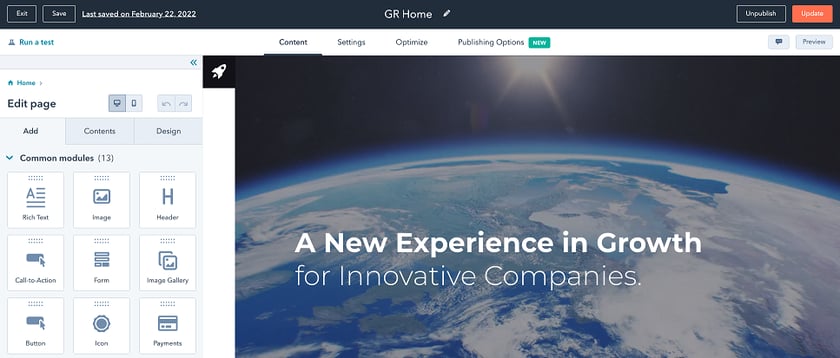
How does HubSpot's drag-and-drop website builder work?
With HubSpot's drag-and-drop website builder, you can easily create a website by dragging and dropping pre-made blocks of content into place. This makes it easy to create a custom website without any coding required. You can also add features and functionality to your website with just a few clicks, making it a great option for businesses who want a professional website without spending hours learning how to code.
What are some of the benefits of using HubSpot's drag-and-drop website builder?
Some of the benefits of using HubSpot's drag-and-drop website builder include:
1. Ease of use - With HubSpot's drag-and-drop website builder, you can easily create a website by dragging and dropping pre-made blocks of content into place. This makes it easy to create a custom website without any coding required.
2. Flexibility - You can choose from a library of templates and designs, or you can create your own custom design. Plus, you can add features and functionality to your website with just a few clicks, making it a great option for businesses who want a professional website without spending hours learning how to code.
3. Cost-effective - HubSpot's drag-and-drop website builder is a free tool that makes it easy to create a professional website without spending a lot of money.
4. Scalability - As your business grows, you can easily add more pages and content to your website with HubSpot's drag-and-drop website builder. This makes it easy to keep your website up-to-date as your business changes and grows.
5. Mobile friendly - HubSpot's drag-and-drop website builder ensures that your website is mobile friendly, which is important given that more and more people are accessing websites on their mobile devices.
How do I get started with HubSpot's drag-and-drop website builder?
To get started with HubSpot's drag-and-drop website builder, you first need to create a free HubSpot account. Then, simply click the "Website" tab and select the "Drag-and-drop website builder" option. This will open the builder and you can start creating your website.