
Publishing a useful video is only the first step in a content strategy. The same knowledge often needs to be repurposed for search, email, sales enablement, and website visitors who prefer reading. Doing that manually means downloading a transcript, editing it, formatting a blog post, creating metadata, and entering everything into HubSpot.
This workflow automates that process. It retrieves a transcript from a YouTube video, sends the transcript to a custom LLM, checks whether the material is strong enough for an article, and creates an unpublished HubSpot blog draft. A content team can then review the draft, add a featured image, make final edits, and publish it.
For example, a consulting company that publishes weekly educational videos can use the workflow to keep its blog aligned with its YouTube channel without rebuilding every article from scratch.
The Workflow
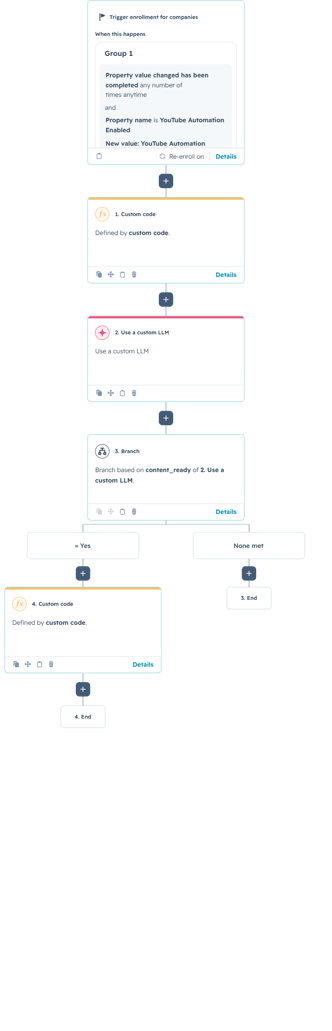
1. Start the automation from a company record
The workflow is company-based and starts when the YouTube Automation Enabled property is updated. This provides a simple manual trigger during testing or for teams that want control over when a video is processed.
The trigger can also be replaced with a more automated option. A serverless function could start the workflow whenever a new video is published, or the workflow could run when a Latest YouTube Video URL property changes. The best trigger depends on whether the company wants fully automatic publishing support or a review step before content generation begins.
2. Retrieve the transcript and video metadata
The first custom-coded action reads the latest YouTube URL and sends it to a transcript service. It validates the URL, extracts the video ID, retries temporary failures, and returns structured outputs such as the transcript, title, channel name, language, video length, and transcript status. The implementation also limits the transcript to 60,000 characters so unusually long videos do not overwhelm later steps.
How the Transcript Logic Works
The complete version also handles invalid URLs, empty transcripts, authentication problems, unavailable videos, rate limits, timeouts, and temporary server errors. Those safeguards are important because the AI step should run only when usable transcript content is available.
3. Turn the transcript into a structured article with a custom LLM
The next action uses a custom LLM rather than a Data Agent prompt. Long transcripts and complete article generation require more output capacity than lightweight classification or summary tasks. The LLM receives the video title, URL, and transcript, then returns separate structured outputs for content readiness, titles, slug, metadata, summary, and the finished HTML body.
You are an expert educational content writer and editor.
Turn the supplied educational video transcript into a complete, accurate, and approachable blog post for internal use.
VIDEO TITLE:
VIDEO URL:
TRANSCRIPT:
Use only information supported by the transcript. Do not invent facts, examples, statistics, quotations, names, recommendations, or conclusions.
Remove greetings, filler words, repetition, conversational interruptions, promotional language, and references that only make sense in a video.
Organize the material into a clear and logical educational article.
WRITING RULES:
Use clear American English.
Use an educational, approachable, and professional tone.
Write for readers who may be unfamiliar with the subject.
Explain technical concepts in plain language.
Preserve useful explanations, steps, examples, warnings, and limitations.
Do not mention the transcript, AI, or the content-generation process.
Do not include an H1 because the HubSpot blog title will serve as the H1.
Do not include images, scripts, CSS, an embedded video, or a call to action.
Write approximately 350–500 words.
Keep post_body_html below 5,000 characters.
Complete every sentence and close every HTML element.
HTML RULES:
Use only these HTML elements:
<p>, <h2>, <h3>, <ul>, <ol>, <li>, <strong>, <em>, and <blockquote>.
CONTENT READINESS:
Set content_ready to true only when the transcript contains enough reliable educational information to create a useful article.
Set content_ready to false when the transcript is empty, incomplete, mostly promotional, unintelligible, or does not contain enough educational information.
OUTPUT FORMAT:
Return exactly one valid JSON object with these keys:
{
"content_ready": true,
"content_warning": "",
"draft_title": "",
"html_title": "",
"slug": "",
"meta_description": "",
"post_summary": "",
"post_body_html": ""
}
FIELD REQUIREMENTS:
content_ready:
A JSON boolean, not a string.
content_warning:
When content_ready is false, briefly explain why. Otherwise return an empty string.
draft_title:
A clear educational blog title, maximum 70 characters.
html_title:
A concise page title, maximum 60 characters.
slug:
A lowercase URL slug containing only letters, numbers, and hyphens.
meta_description:
An accurate description, maximum 155 characters.
post_summary:
One concise sentence explaining what readers will learn, maximum 250 characters.
post_body_html:
The complete HTML article.
STRICT RESPONSE RULES:
Return JSON only.
Do not use Markdown or code fences.
Do not include notes or explanations outside the JSON object.
Escape all characters required for valid JSON.
Never stop in the middle of the JSON object or HTML article.
When content_ready is false, return empty strings for all blog fields.
4. Stop weak content before it reaches the blog
The workflow branches on the content_ready output. If the answer is false, the workflow ends without creating a draft. This prevents empty, promotional, incomplete, or low-information videos from becoming low-quality blog content.
If the content is ready, the workflow continues to the publishing action. This quality gate is one of the most important parts of the automation because it separates content generation from automatic acceptance.
5. Create an unpublished HubSpot blog draft
The final custom-coded action validates the LLM outputs, sanitizes the slug, limits metadata length, and sends the article to HubSpot’s CMS API. It uses the configured blog ID and optional author ID, then creates the post without publishing fields so the result remains a draft.
How the Draft Creation Logic Works
const contentReady = parseBoolean(
  event.inputFields["content_ready"]
);

if (!contentReady) {
  return callback({
    outputFields: {
      blog_created: false,
      blog_post_id: "",
      blog_error:
        contentWarning ||
        "The generated content was not marked as ready."
    }
  });
}

const payload = {
  name: title,
  htmlTitle: htmlTitle.slice(0, 200),
  contentGroupId: blogId,
  slug,
  language: "en",
  metaDescription,
  postSummary,
  postBody,
  useFeaturedImage: false
};

const response = await axios.post(
  "https://api.hubapi.com/cms/v3/blogs/posts",
  payload,
  {
    headers: {
      Authorization: `Bearer ${accessToken}`,
      "Content-Type": "application/json"
    }
  }
);
The action can also return the new blog post ID, allowing the workflow to create a review task, notify a content manager, or store a link for the editorial team.
Use Cases
1. Educational video libraries
Training companies, consultants, and software teams can convert recurring tutorials and demonstrations into searchable articles while preserving the original explanations and limitations.
2. Executive and subject-matter expert content
Interviews, webinars, and expert recordings can become structured drafts without requiring the speaker to write the article personally. Editors still retain control before publication.
3. Multi-channel content operations
Marketing teams can use one video as the source for a blog draft, email summary, social copy, and sales enablement material, creating a repeatable content pipeline around each recording.
Wrapping Up
This workflow connects transcript retrieval, custom LLM generation, quality control, and HubSpot CMS draft creation in one process. It reduces repetitive editorial work while keeping a human review step before publication.
No Bounds Digital helps businesses design AI-powered HubSpot workflows, build custom-coded actions, connect external data sources, and turn manual campaign decisions into reliable automation. Contact No Bounds Digital to discuss AI services or custom HubSpot development for your next workflow.