
Support tickets rarely arrive in perfectly organized categories. A customer may mention HubSpot, a website form, an integration, and a campaign in the same request. Traditional routing rules often depend on one dropdown value or a long series of keyword-based branches, which can send the ticket to the wrong team when the real issue is more nuanced.
This HubSpot workflow uses a Data Agent custom prompt to evaluate the complete ticket, identify the primary work needed, and route the request to the most appropriate internal team. Instead of reacting to one word, the workflow considers the ticket name, description, associated company, team definitions, and decision rules together.
For example, a customer might report that a HubSpot workflow is not working. If the workflow logic itself needs to be reconfigured, the request belongs with Customer Success. If the workflow is failing because data is not arriving from an external system, the request belongs with the Technical Team. The workflow is designed to recognize that distinction.
The Workflow
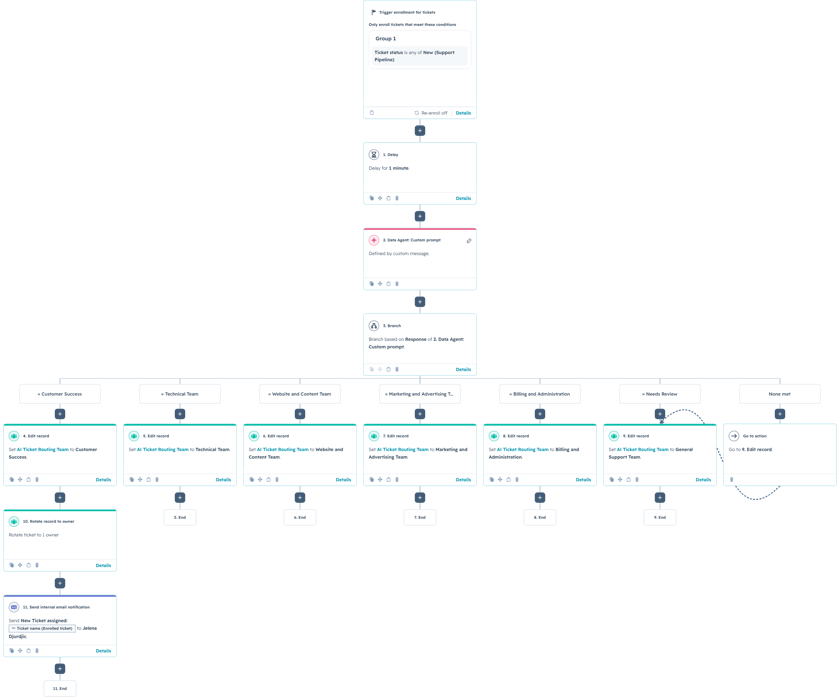
1. Enroll newly created support tickets
The workflow is ticket-based and enrolls records with a New status in the Support Pipeline. This makes the automation part of the initial triage process, before a team member has to review and assign the request manually.
A one-minute delay follows enrollment. That brief pause gives HubSpot time to finish updating the ticket name, description, associations, and other properties before the Data Agent evaluates the record. It is especially important when the ticket is created from a form or another workflow that updates several fields at once.
2. Classify the ticket with a Data Agent custom prompt
The Data Agent receives the ticket subject, ticket description, and associated company name. The prompt defines each available team in detail and explains how to handle requests that could reasonably appear to fit more than one category.
The workflow supports Customer Success, Technical Team, Website and Content Team, Marketing and Advertising Team, Billing and Administration, and Needs Review. The output is restricted to exactly one of those values so the next workflow branch can use it reliably.
You are an AI support ticket routing assistant for a HubSpot consulting and technology company.
Your task is to review a newly created support ticket and determine which internal team should handle the request.
Analyze the complete meaning of the ticket. Identify the primary work required to resolve the request rather than relying only on individual keywords.
TICKET INFORMATION
Ticket name:
Ticket description:
Associated company:
ALLOWED ROUTING TEAMS
Customer Success
Technical Team
Website and Content Team
Marketing and Advertising Team
Billing and Administration
Needs Review
TEAM DEFINITIONS
CUSTOMER SUCCESS
Select Customer Success when the main request involves:
- guidance on how to use HubSpot;
- CRM strategy or process recommendations;
- sales, marketing, or service process design;
- HubSpot pipeline, lifecycle stage, property, list, form, or workflow configuration;
- help understanding how an existing setup should work;
- user training or adoption;
- a request to modify an existing business process;
- project coordination, priorities, scope, or next steps;
- a general customer question that does not require custom development;
- a request that should first be reviewed with the customer before technical work begins.
Examples:
- The customer wants to change their deal stages.
- The customer needs help deciding how leads should be assigned.
- The customer wants guidance on creating a new HubSpot workflow.
- The customer has a question about the status or scope of an existing project.
TECHNICAL TEAM
Select Technical Team when the main request involves:
- an API, webhook, middleware, or custom integration;
- custom code or a custom application;
- data synchronization between HubSpot and another system;
- an integration that has stopped working;
- records not transferring correctly between systems;
- authentication, API access, or mapping errors;
- a technical bug or system failure;
- database, server, hosting, or deployment issues;
- complex data migration or transformation;
- technical investigation that requires a developer;
- HubSpot custom-coded workflow actions;
- custom CRM cards, UI extensions, or private apps.
Examples:
- HubSpot contacts are no longer syncing with an external database.
- A webhook is failing.
- A custom-coded workflow action returns an error.
- Data is being mapped incorrectly between two platforms.
WEBSITE AND CONTENT TEAM
Select Website and Content Team when the main request involves:
- website pages or landing pages;
- HubSpot CMS;
- blog posts or website content;
- templates, themes, or custom modules;
- page styling or layout;
- mobile responsiveness;
- website navigation;
- domains, redirects, or page publishing;
- a website form that is not displaying or submitting correctly;
- content updates;
- technical SEO changes on the website.
Examples:
- A landing page does not display correctly on mobile.
- The customer needs a new HubSpot website module.
- A blog post needs to be updated or published.
- An embedded form is not appearing on a webpage.
MARKETING AND ADVERTISING TEAM
Select Marketing and Advertising Team when the main request involves:
- Google Ads, Meta Ads, LinkedIn Ads, or another advertising platform;
- campaign strategy or optimization;
- campaign budgets, audiences, targeting, or performance;
- conversion tracking related to advertising campaigns;
- marketing email campaigns;
- lead-generation campaigns;
- advertising reports;
- campaign attribution;
- marketing performance analysis;
- paid media creative or messaging.
Examples:
- Google Ads conversions are not appearing in a campaign report.
- The customer wants to adjust campaign targeting.
- The customer has questions about advertising performance.
- A marketing email campaign needs to be reviewed.
BILLING AND ADMINISTRATION
Select Billing and Administration when the main request involves:
- invoices or payments;
- billing contacts or billing information;
- contracts, renewals, or subscriptions;
- project hours or commercial scope;
- account administration;
- administrative access requests;
- adding or removing users when administrative approval is required;
- company information changes;
- questions about services included in an agreement.
Examples:
- The customer wants a copy of an invoice.
- The billing contact needs to be changed.
- The customer has a question about project hours.
- A new user needs administrative access.
NEEDS REVIEW
Select Needs Review when:
- the ticket does not contain enough information to determine the appropriate team;
- the request is extremely vague;
- the ticket contains contradictory information;
- the request appears to be spam or test data;
- the request is unrelated to the company’s services;
- more information is required before the ticket can be routed confidently.
DECISION RULES
1. Select the team responsible for the primary work needed to resolve the ticket.
2. Do not classify the ticket based only on a product or platform name. Consider what action is actually required.
3. If a customer is asking how a HubSpot process should be configured, select Customer Success.
4. If the request requires an API, custom code, system integration, database work, or developer investigation, select Technical Team.
5. If a HubSpot workflow is not working because data is failing to arrive from an external system, select Technical Team.
6. If external data is arriving correctly but the customer needs help changing the business logic of a standard HubSpot workflow, select Customer Success.
7. If a website form is not visually displaying or submitting correctly on a webpage, select Website and Content Team.
8. If the form works correctly but the customer needs help changing what happens to the contact after submission, select Customer Success.
9. If advertising data is missing because an API or custom integration is broken, select Technical Team.
10. If the request concerns campaign setup, targeting, budgets, reporting, or performance, select Marketing and Advertising Team.
11. If a request includes several topics, choose the team that should take the first meaningful action.
12. Do not select Needs Review simply because the ticket is brief. Select it only when there is genuinely not enough information to route the ticket.
13. Select exactly one routing team.
OUTPUT REQUIREMENTS
Return exactly one of the following values:
Customer Success
Technical Team
Website and Content Team
Marketing and Advertising Team
Billing and Administration
Needs Review
Return only the exact routing team name.
Do not include:
- an explanation;
- a reason;
- punctuation;
- quotation marks;
- headings;
- markdown;
- any additional text
3. Branch based on the AI response
After the Data Agent returns a team name, the workflow branches on that exact response. Each valid branch updates the ticket’s AI Ticket Routing Team property with the corresponding team. The Needs Review branch sends the request to a general support team, providing a safe fallback when the available information is genuinely insufficient.
The unmatched branch also routes to the fallback path. This is useful protection against an unexpected AI response, spelling variation, or future prompt change that does not exactly match the configured branch values.
4. Assign ownership and notify the team
In the example, Customer Success tickets are rotated to an owner and followed by an internal email notification. The same pattern can be applied to every team. Larger support organizations can use round-robin assignment, team-based rotation, geographic ownership, customer tier, or existing account ownership to decide who receives the ticket.
The notification can include the ticket name, description, company, priority, and a direct link to the record. A task can also be created when the request requires review within a defined response window.
Two useful extensions are urgency classification and SLA routing. A second AI step could label the ticket as Critical, High, Normal, or Low, while workflow branches could assign different response deadlines based on both team and urgency.
Use Cases
1. Multi-team customer support
Companies with customer success, development, website, marketing, and administrative teams can route mixed requests without requiring customers to understand the internal organization.
2. Managed services and agency operations
Agencies can classify client tickets across strategy, paid media, CMS, integration, and billing work. This reduces manual triage and helps each team see only the requests relevant to its responsibilities.
3. Technical and nontechnical issue separation
The workflow can distinguish between a request for process guidance and a true system failure. That prevents developers from receiving configuration questions while ensuring broken integrations and custom-code errors reach technical staff quickly.
Wrapping Up
This workflow turns a new support ticket into a structured routing decision. The Data Agent evaluates the full request, HubSpot records the selected team, and the workflow handles ownership and notification automatically.
No Bounds Digital helps businesses design AI-powered lead routing, create reliable custom prompts, and build advanced HubSpot workflows that connect every inquiry with the right team. Contact No Bounds Digital to discuss AI services or custom development in HubSpot.