
Public forms make it easy for prospective customers to contact a business, but they also attract bots, cold sales pitches, backlink requests, and unrelated submissions. When every form fill enters the CRM as a new contact, sales teams can waste time reviewing records that were never real opportunities.
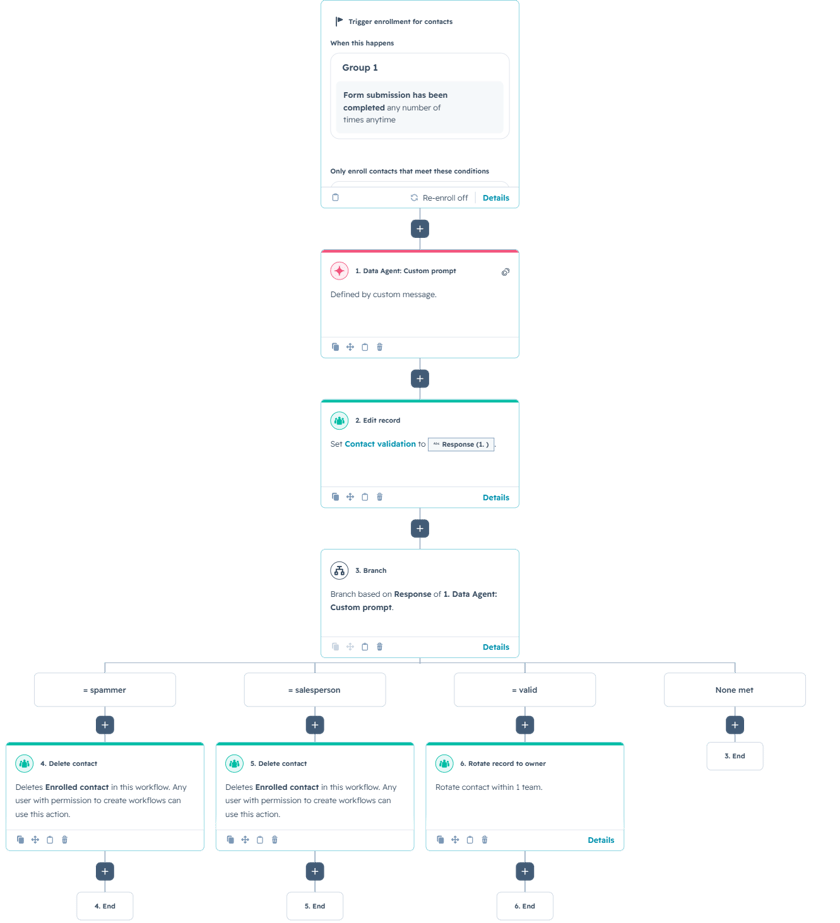
This HubSpot workflow uses Breeze Data Agent to review the email address, message, and IP country associated with a form submission. It classifies the contact as Spammer, Salesperson, or Valid, records that result on the contact, and then takes a different action for each branch.
For example, a coherent request asking about pricing, services, or next steps can be treated as a valid inquiry and assigned to a contact owner. A generic SEO pitch with a meeting link can be classified as a salesperson, while nonsensical text or suspicious links can be flagged as spam.
The Workflow
1. Enroll contacts after a form submission
The workflow begins when a contact completes a HubSpot form. It can be configured for all forms or limited to specific high-risk forms, such as a public Contact Us form that receives frequent spam. Optional enrollment conditions can also require properties such as Email and First Name to be known before the contact is processed.
In a production setup, the trigger should be narrow enough to avoid processing unrelated form submissions. Re-enrollment can be enabled when the same contact may submit another form later, but the workflow should also account for previously validated contacts so they are not repeatedly reviewed without a reason.
2. Classify the submission with a Data Agent custom prompt
The Data Agent receives three inputs: the contact’s email address, the submitted message, and the IP country. The prompt defines the difference between spam, unsolicited sales outreach, and a legitimate inquiry. It also makes clear that country should be treated only as a supporting signal, not as the sole reason for rejecting a submission.
The output is restricted to exactly one of three values. That strict format is essential because the workflow uses the response directly for the Contact Validation property and the following branch logic.
You are reviewing a HubSpot form submission to determine whether the submission is from a Spammer, a Salesman, or a Legitimate Contact.
Use ONLY the following inputs:
Email:
Message:
IP Country:
Classification Rules
Return exactly one of the following categories:
1) Spammer
Choose Spammer if the message shows strong spam signals such as:
Random, nonsensical, or irrelevant text
Generic praise with no context (“Great post”, “Nice website”) and no real intent
Link dumping, suspicious URLs, shortened links, or obvious SEO backlink attempts
Crypto/investment scams, “get rich quick”, loans, hacking, adult content, etc.
Strange formatting, keyword stuffing, or clearly automated/bot language
Fake identity signals (name/email mismatch, weird domain, gibberish email local-part)
Repeated submissions / looks mass-generated
Message content doesn’t match a reasonable business inquiry
2) Salesperson
Choose Salesman if the message is a solicitation such as:
Selling services/products (marketing, SEO, web dev, lead gen, outsourcing, software, staffing)
Partnership pitches, guest post requests, backlink requests
“We can help you grow your business” type outreach
Cold pitch language, pricing talk, meeting links, Calendly, or “quick call” requests
Recruitment / hiring pitches or “I represent an agency” messages
3) Valid Contact
Choose Legitimate Contact if the message appears to be a real inquiry from a prospective customer, partner, or real person such as:
Specific questions about services, pricing, timelines, support, or capabilities
Mentions their company, situation, problem, or clear context
Requests a quote, consultation, demo, or next steps related to your business
Message tone and content is coherent and relevant
IP Country Guidance (Use as a supporting signal, not the only factor)
If the message is spammy AND the IP country is unexpected or mismatched with the message context, that strengthens Spammer
If the message is a sales pitch regardless of country, classify as Salesman
Do not classify as spam solely due to country—use it only as a tie-breaker
Output Format (STRICT)
Return ONLY the category name as plain text, exactly one of:
Spammer
Salesperson
Valid
3. Store the classification on the contact
After the Data Agent runs, the workflow writes its response to a Contact Validation property. Storing the result before branching creates a visible audit trail on the record and allows the classification to be used in lists, reports, and future workflows.
It also makes testing easier. A workflow administrator can open the contact record and confirm whether the submission was labeled Spammer, Salesperson, or Valid before reviewing what happened next.
4. Branch based on the classification
The workflow branches on the exact Data Agent response. In the example, Spammer and Salesperson records are deleted, while Valid contacts are rotated to a contact owner. The unmatched branch ends without taking further action.
Automatic deletion is aggressive and should be used only when the business is comfortable with the risk of a false positive. A safer variation is to place suspected spam and sales outreach into suppression lists, mark them as non-marketing contacts, or create a review queue before deletion. The Valid branch can also create a sales task or send an internal notification so a team member follows up quickly.
The logic can be expanded with additional classifications such as Existing Customer, Job Applicant, Vendor, or Needs Review. A confidence threshold or manual-review branch can also be added for borderline submissions.
Use Cases
1. Protecting high-volume contact forms
Businesses receiving large numbers of public form submissions can automatically separate genuine inquiries from obvious spam and unsolicited sales messages before those records reach the sales team.
2. Improving sales productivity
Valid contacts can be assigned immediately, while non-opportunity submissions are filtered into a different process. This keeps sales representatives focused on people who are more likely to need the company’s services.
3. Improving CRM data quality
Form spam can distort lead counts, conversion rates, attribution reports, and marketing databases. Classifying records at intake creates cleaner data and more reliable reporting across the rest of HubSpot.
Wrapping Up
This workflow adds an AI-powered quality check between a form submission and the sales process. Breeze evaluates the message in context, HubSpot records the classification, and the workflow determines whether the contact should be assigned, reviewed, suppressed, or removed.
No Bounds Digital helps businesses design AI-powered lead routing, create reliable custom prompts, and build advanced HubSpot workflows that connect every inquiry with the right team. Contact No Bounds Digital to discuss AI services or custom development in HubSpot.