
Lead routing often starts with a simple rule: if a prospect selects one option, send the record to one team. That works until a form captures several business goals, several challenges, and an open-text explanation that points in more than one direction. A prospect may mention AI, automation, reporting, and disconnected systems in the same submission. A traditional workflow can easily route that lead based on the wrong signal.
This HubSpot workflow uses a Data Agent custom prompt to evaluate the submission as a whole, identify the prospect’s primary or foundational need, and return one approved routing category. HubSpot then updates the contact, assigns an appropriate owner, and can create a follow-up task or notification.
For example, a contact may request AI-driven automation while also explaining that several systems are disconnected. The prompt is instructed to prioritize Data Migration and Integrations because the systems must be connected before the automation can work reliably.
The Workflow
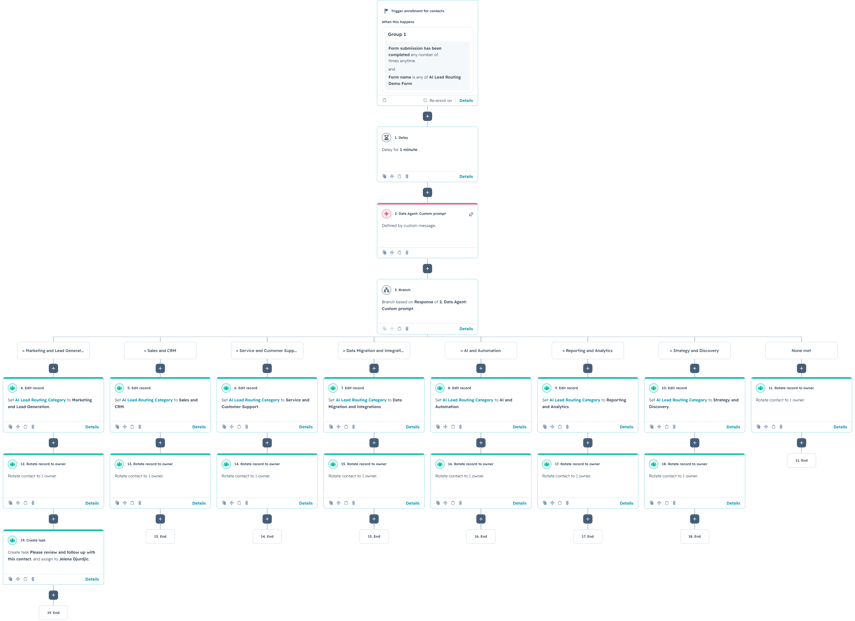
1. Enroll contacts after the lead-routing form is submitted
The contact-based workflow begins when someone submits the designated lead-routing form. The form collects standard information such as company and job title, along with multiple-checkbox properties for business goals and current challenges. It also includes an open-text field where the prospect can describe what they are trying to achieve.
Those fields give the Data Agent more useful context than a single dropdown. The selected options reveal common needs, while the open-text response can clarify urgency, dependencies, and the actual outcome the prospect wants.
2. Add a short delay before the AI step
The workflow waits briefly after the form submission before running the Data Agent. This gives HubSpot time to finish writing the submitted values to the contact record. Without the delay, the prompt could run before every property has updated and classify the inquiry using incomplete information.
The delay does not need to be long. Its purpose is simply to create a reliable buffer between the form event and the AI action.
3. Use a custom prompt to classify the lead
The Data Agent receives the company, job title, selected goals, selected challenges, and additional project details. The prompt defines the only routing categories the AI is allowed to return and explains when each category should be selected.
The priority rules are especially important. They tell the model how to handle overlapping or dependent needs instead of selecting a category because one related checkbox appears in the submission. The output rules then require one exact category name and prohibit explanations, punctuation, headings, or additional text. That makes the result dependable enough to use directly in HubSpot branches.
You are an AI lead routing assistant for a HubSpot consulting and technology company.
Analyze the information submitted by the contact and determine the single most appropriate team to handle the inquiry.
CONTACT INFORMATION
Company:
Job title:
Business goals selected:
Current challenges selected:
Additional project details:
ALLOWED ROUTING CATEGORIES
Marketing and Lead Generation
Sales and CRM
Service and Customer Support
Data Migration and Integrations
AI and Automation
Reporting and Analytics
Strategy and Discovery
CLASSIFICATION RULES
Select Marketing and Lead Generation when the main requirement is:
- generating more qualified leads;
- improving marketing campaigns;
- lead nurturing;
- conversion optimization;
- marketing automation.
Select Sales and CRM when the main requirement is:
- improving sales follow-up;
- pipeline management;
- lead management;
- sales processes;
- CRM adoption or configuration.
Select Service and Customer Support when the main requirement is:
- customer support;
- ticket management;
- help desk processes;
- customer communication;
- improving the customer experience.
Select Data Migration and Integrations when the main requirement is:
- connecting systems;
- synchronizing data;
- migrating CRM data;
- cleaning or restructuring data;
- resolving disconnected systems.
Select AI and Automation when the main requirement is:
- implementing AI;
- automating repetitive processes;
- generating content or analysis using AI;
- creating intelligent business automations.
Select Reporting and Analytics when the main requirement is:
- dashboards;
- attribution;
- performance reporting;
- data visibility;
- analytics.
Select Strategy and Discovery when:
- the contact is unsure where to start;
- the request is too broad or unclear;
- there is not enough information to select another category confidently.
PRIORITY RULES
When multiple needs are selected, identify the primary or foundational requirement.
- If systems must be connected before automation can work, select Data Migration and Integrations.
- If data must be cleaned or migrated before reporting can be reliable, select Data Migration and Integrations.
- If CRM processes must be established before sales reporting or automation can work, select Sales and CRM.
- If the contact mentions AI but does not identify a clear process or use case, select Strategy and Discovery.
- Do not select a category only because one related checkbox was selected. Consider all submitted information together.
OUTPUT REQUIREMENTS
Return exactly one of the allowed routing category names.
Do not include:
- an explanation;
- quotation marks;
- punctuation;
- headings;
- additional text.
4. Branch by category and update the contact
The workflow branches based on the Data Agent response. Each valid branch writes the result to the AI Lead Routing Category property and rotates the contact to an owner associated with that team. The example includes branches for marketing, sales and CRM, service, integrations, AI and automation, reporting, and strategy.
A fallback branch handles responses that do not exactly match one of the approved categories. Rather than silently losing the lead, this path can assign the record to a general owner for manual review.
5. Create the appropriate follow-up
After assignment, the workflow can create a task, send an internal notification, or trigger a team-specific follow-up sequence. In the marketing branch, for example, HubSpot creates a task asking the assigned owner to review and follow up with the new lead. The same pattern can be added to every category.
Use Cases
1. Multi-service consulting and technology firms
Route inquiries across marketing, sales, service, integrations, automation, analytics, and strategy teams without expecting prospects to understand the company’s internal structure.
2. Complex sales qualification
Use the prompt to evaluate several selected needs and determine which requirement must be solved first. This helps sales teams avoid treating every checkbox as equally important.
3. Specialist and regional assignment
Expand the prompt with industry, company size, geography, urgency, or technical requirements, then use additional branches to assign the contact to the most relevant specialist within the selected team.
Wrapping Up
This workflow replaces rigid checkbox-based routing with a context-aware decision. The form captures the prospect’s full request, the custom prompt identifies the primary need, and HubSpot manages categorization, ownership, and follow-up automatically.
No Bounds Digital helps businesses design AI-powered lead routing, create reliable custom prompts, and build advanced HubSpot workflows that connect every inquiry with the right team. Contact No Bounds Digital to discuss AI services or custom development in HubSpot.