
A candidate score is useful, but it does not always tell recruiters who deserves attention first. A score of 80 may place someone near the top of one applicant pool and in the middle of another. Fixed thresholds ignore the strength of the overall group, which can make shortlists too broad for some roles and too narrow for others.
This HubSpot workflow solves that problem by comparing every candidate associated with the same job and automatically flagging the strongest group. Instead of asking whether a candidate exceeds one universal score, the workflow asks whether that candidate belongs to the top 20% for the specific role.
For example, when a job has 20 applicants, the workflow identifies the top four. When a job has only six applicants, it still selects at least two so the recruiter has a practical shortlist to review. Once selected, top applicants trigger an internal notification and a follow-up task.
The Workflow
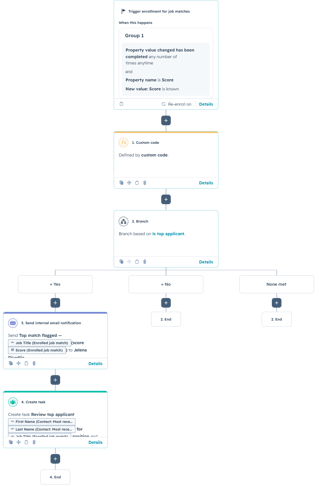
1. Enroll Job Match records when a score changes
The workflow is built on a custom object called Job Match. Each Job Match record connects a candidate with a specific job and stores the score used for ranking. The record enrolls whenever its Score property becomes known or changes. Re-enrollment is enabled so the ranking can be recalculated as new candidates apply or existing candidate scores are updated.
This is important because the result is relative. A candidate who is in the top group today may move out of it after a stronger applicant is added. The workflow therefore needs to evaluate the entire applicant pool again rather than only checking the record that triggered the run.
2. Retrieve every candidate connected to the same job
The custom-coded action first identifies the enrolled Job Match record and reads its job_id. It then searches HubSpot for every other Job Match record with that same job ID. The search returns each candidate’s current score and existing is_top_applicant value.
This is the key difference between ordinary workflow logic and group-based ranking. A normal workflow action evaluates one record at a time. The custom code creates the broader context needed to compare related records and determine where each candidate stands within the same applicant pool.
3. Rank the candidates and calculate the shortlist
The code sorts all matching records from the highest score to the lowest. It then calculates the number of applicants that should be flagged using two rules: select the top 20%, but never select fewer than two people.
Both values are configurable. A high-volume recruiting team could identify only the top 10% or 5%, while a smaller organization might increase the minimum shortlist size. The correct settings depend on the number of applicants and how much manual review the hiring team can reasonably complete.
How the Custom Logic Works
The excerpt below shows the core ranking and update logic. Authentication, record validation, and supporting error messages are summarized to keep the article focused on the reusable approach.
The update step handles both sides of the ranking. Candidates above the cutoff are marked as top applicants, while everyone else is explicitly set to false. That second part prevents outdated flags from remaining on records after the ranking changes.
Updates are sent back to HubSpot in batches of up to 100 records. Batch updates are more efficient than sending a separate API request for every candidate, especially for roles with large applicant pools. The action also returns the number of flagged records so later workflow steps can use it if needed.
4. Notify the recruiter and create a review task
After the custom code finishes, the workflow branches on the Is top applicant property. Records marked Yes continue to an internal email notification and a recruiter task. The notification can include the job title and score, while the task can include the candidate’s name, the related job, and any other information the recruiter needs before reviewing the application.
Candidates marked No, along with unmatched responses, simply exit the workflow. This keeps recruiter attention focused on the strongest current applicants without creating unnecessary tasks for the rest of the pool.
Use Cases
1. Recruiting and applicant shortlisting
Automatically surface the strongest candidates for every open role, even when score distributions vary significantly between positions.
2. Lead and opportunity ranking
Apply the same approach to rank leads within a campaign, partner applications within a program, or opportunities within a territory. HubSpot can flag the highest-performing records relative to their own group instead of using one global threshold.
3. Service and operational prioritization
Support cases, project requests, grant submissions, or vendor applications can be compared within a shared category. The workflow can identify the strongest, highest-risk, or most urgent percentage and route those records for immediate review.
Wrapping Up
This workflow turns an individual score into meaningful group context. Custom code gathers related records, ranks them, maintains an accurate shortlist, and gives the rest of the HubSpot workflow a simple property it can use for notifications, tasks, and reporting.
No Bounds Digital helps businesses design AI-powered HubSpot workflows, build custom-coded actions, connect external data sources, and turn manual campaign decisions into reliable automation. Contact No Bounds Digital to discuss AI services or custom HubSpot development for your next workflow.