
Redirects are one of those “invisible” website systems that quietly protect your traffic, rankings, and user experience—until they pile up, break, or start pointing to the wrong places. In this post, we’ll cover the practical reasons redirects exist, how they impact SEO and AI-driven discovery, how to manage redirects in HubSpot, and why periodic cleanup is worth doing.
1) Practical Reasons Websites Use Redirects
A redirect tells browsers and bots: “This URL has moved—go here instead.” In real life, redirects are essential when websites change over time.
Common, practical redirect scenarios
- You changed a page URL (slug) or moved content (e.g., restructuring services, consolidating blog categories, replatforming).
- You retired a page but still want visitors to land somewhere helpful instead of hitting a dead end.
- You migrated domains (e.g., oldsite.com → newsite.com) and need legacy links to keep working.
- You fixed duplicates (HTTP → HTTPS, www vs non-www, trailing slash issues) and want one consistent version.
- You ran campaigns with short URLs that later need to route to permanent pages.
In short: redirects preserve continuity. They keep old links from breaking and guide people (and crawlers) to the most current, relevant destination.
2) The SEO and AI Optimization Impact of Redirects
Redirects can protect SEO
From an SEO perspective, redirects are often the difference between “we changed URLs and lost rankings” and “we changed URLs and kept most of the value.” Google explicitly recommends using a permanent server-side redirect when you need to change a page’s URL as shown in search results. In practice, that typically means a 301.
Where redirects start to hurt SEO
Redirects become an SEO liability when they’re messy or misleading. The most common issues are:
- Redirect chains (A → B → C) that waste crawl time and add latency.
- Redirect loops (A → B → A) that can trap crawlers and users.
- Redirects that end in 404s, which leak link equity and create dead ends.
- Irrelevant redirects (e.g., everything → homepage), which can weaken topical relevance and frustrate users.
Redirects and AI optimization (LLM + AI crawler visibility)
AI-driven discovery (search assistants, AI crawlers, and LLM-powered “answer engines”) still depends heavily on the same foundational signals as SEO: accessible pages, clear content relationships, and consistent URL behavior.
Redirect quality matters for AI visibility because:
- AI systems often follow links the way search crawlers do. Clean redirects help them reach the correct canonical content quickly.
- Chains and dead ends reduce confidence. If a system hits multiple hops, inconsistent destinations, or 404s, it can treat the path as unreliable (and may move on).
- Topical relevance still matters. Redirecting an old URL to a semantically unrelated page increases the odds of misclassification—both for SEO and AI summarization.
- Consistency improves citation and retrieval. If your content is frequently referenced (backlinks, bookmarks, mentions), strong redirect hygiene makes it easier for AI tools to retrieve and cite the right page.
Think of redirects as “navigation metadata.” When that metadata is clean, both search engines and AI systems get to the right content with fewer errors and less ambiguity.
3) How to Create Redirects Using HubSpot’s URL Redirects Tool
HubSpot provides a built-in URL Redirects tool for HubSpot-hosted domains. HubSpot supports both Standard redirects (one-to-one) and Flexible pattern redirects (rule-based patterns that can redirect many URLs at once).
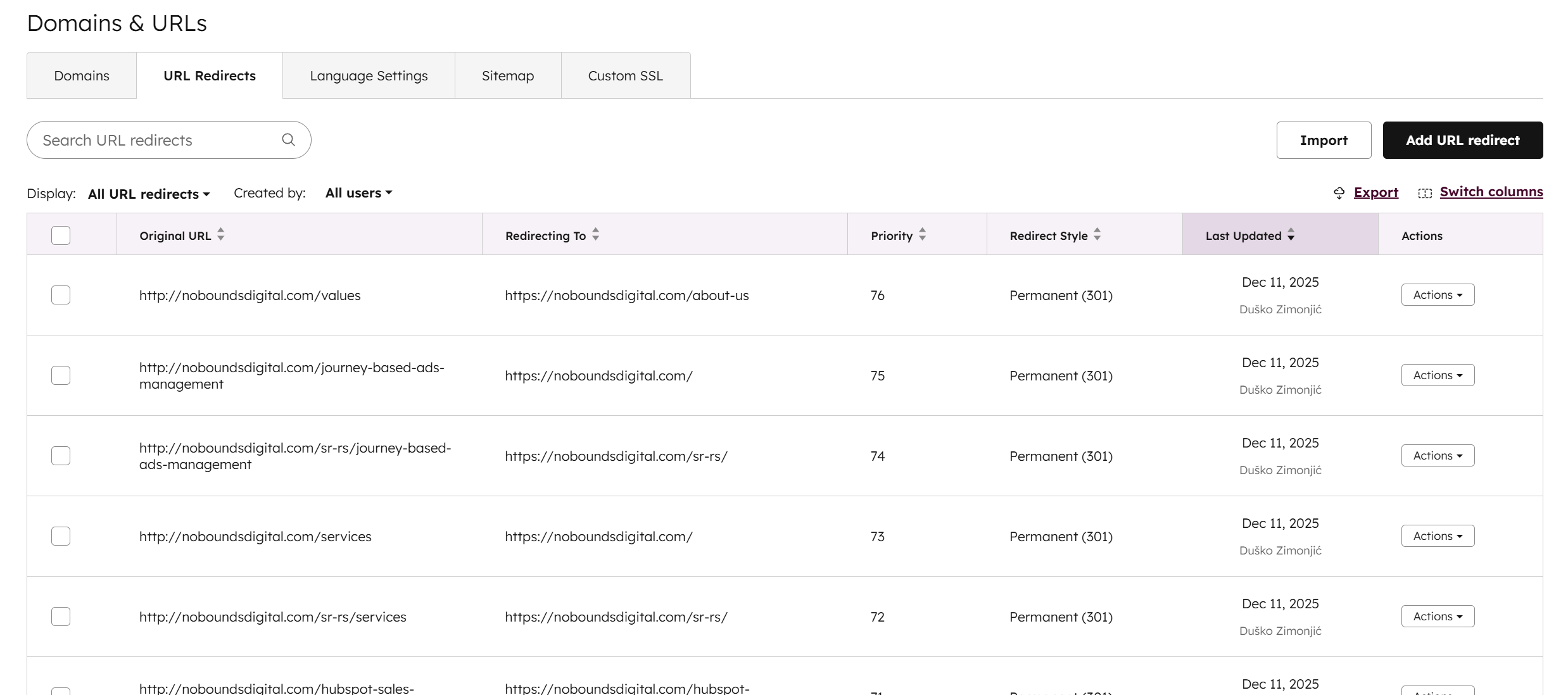
Add a new redirect (Standard or Flexible)
- In HubSpot, click the settings icon.
- Navigate to Content → Domains & URLs.
- Click the URL Redirects tab.
- Click Add URL redirect.
- Select Standard or Flexible redirect type.
- Enter the Original URL (full URL or path).
- Enter the Redirect to destination (use the full URL including http/https when redirecting off HubSpot-hosted pages).
- (Optional) Click More options to configure advanced behavior such as redirect style (301/302/305) and priority.
- Click Add URL redirect to save.
These steps and options are documented in HubSpot’s Knowledge Base.
Advanced options you should actually care about
- Redirect style: HubSpot supports Permanent (301), Temporary (302), and Proxy (305). Permanent (301) is the default for new redirects.
- Priority: If more than one redirect could match a URL, HubSpot applies the redirect with the lowest priority value.
- System redirects vs manual redirects: HubSpot can create system redirects automatically when published content URLs change; these system redirects can’t be edited.
Bulk upload redirects (when you have a lot)
If you have many redirects to add or update, HubSpot allows a CSV import in the URL Redirects tool. HubSpot notes a maximum of 500 redirects per bulk import and a maximum URL length limit for the uploaded entries.
4) Why You Should Do Periodic Redirect Cleanup
Redirects tend to accumulate over years of content updates, migrations, and quick fixes. Periodic cleanup helps you:
- Preserve link equity by preventing broken redirect paths.
- Improve crawl efficiency by eliminating chains and loops.
- Reduce user friction by ensuring people land where they expect.
- Improve AI retrievability by making URL behavior consistent and reliable.
The cadence varies depending upon how frequently you modify your website, but somewhere between quarterly and annually is a good bet in addition to anything that you make major changes like redeveloping your website, migrating a website, or similar.
When to edit or delete existing redirects
1. The redirect points to the wrong or irrelevant page
Edit or delete if:
- The destination content changed and no longer matches the original intent
- A “catch-all” redirect sends users to a generic page (e.g., homepage) when a better match exists
- The redirect was a temporary workaround that’s no longer appropriate
Fix: Update the redirect to the most semantically relevant page.
2. Redirect chains or loops exist
Edit (or consolidate) if:
- A chain exists: A → B → C
- A loop exists: A → B → A
Fix: Point the original URL directly to the final destination and remove intermediates.
3. The original URL no longer has value
Delete if:
- No backlinks
- No organic traffic
- No historical importance
- No bookmarks or internal references
Rule of thumb: If nobody (users or search engines) needs it anymore, you don’t need to preserve it.
4. The redirect is outdated due to site restructuring
Edit or delete when:
- Category structures changed
- Blog URLs were consolidated
- Product/service offerings evolved
Fix: Update the redirect to the new best-fit URL, not an old fallback.
5. Redirect was meant to be temporary (302 / campaign-specific)
Delete or convert to 301 if:
- The campaign ended
- The temporary content is gone
- The page is now permanently replaced
Best practice: Temporary redirects have a habit of becoming permanent by accident—review them regularly.
6. Redirect is masking a better solution
Delete if the original page should now return:
- 410 Gone (intentionally removed)
- 404 Not Found (no replacement exists)
This is common with old blog posts that are factually wrong, retired products with no successor, or legal/compliance removals.
7. Redirect conflicts with canonical URLs
Edit or delete if:
- Redirect contradicts canonical logic
- Multiple URLs redirect inconsistently to different canonicals
- You’re seeing duplicate indexing issues
Rule: Redirects and canonicals should tell the same story.
8. Platform or CMS changes made the redirect unnecessary
Delete when:
- The URL now resolves correctly on its own
- Routing or slug handling fixed the issue
- HTTPS/www/trailing slash behavior is now handled globally
9. Redirect causes UX or conversion harm
Edit or delete if:
- Users land somewhere unexpected
- Bounce rates spike
- Conversion paths break
Reminder: SEO value ≠ business value. If a redirect hurts conversions, it needs attention.
Practical maintenance checklist
- Identify and collapse redirect chains
- Fix redirects that end in 404s
- Validate destination relevance (intent match)
- Remove “temporary forever” redirects
- Align redirects with current information architecture and offerings
- Update internal links to point directly to final URLs (not redirected URLs)
Final Takeaway
Redirects are essential plumbing for SEO, UX, and long-term maintainability. The goal isn’t “no redirects”—it’s clean, intentional redirects: single-hop, relevant, and periodically reviewed.
If your site has hundreds of redirects (especially chains, loops, or redirects to 404s), a cleanup project is often one of the highest ROI technical SEO fixes you can do.