
Not every lead who submits a form is ready for the same follow-up. One person may be researching options for later in the year, while another is facing a failed integration, a campaign launch in three weeks, or an operational problem that is already affecting revenue. When both contacts enter the same queue, the most urgent opportunity can easily get buried.
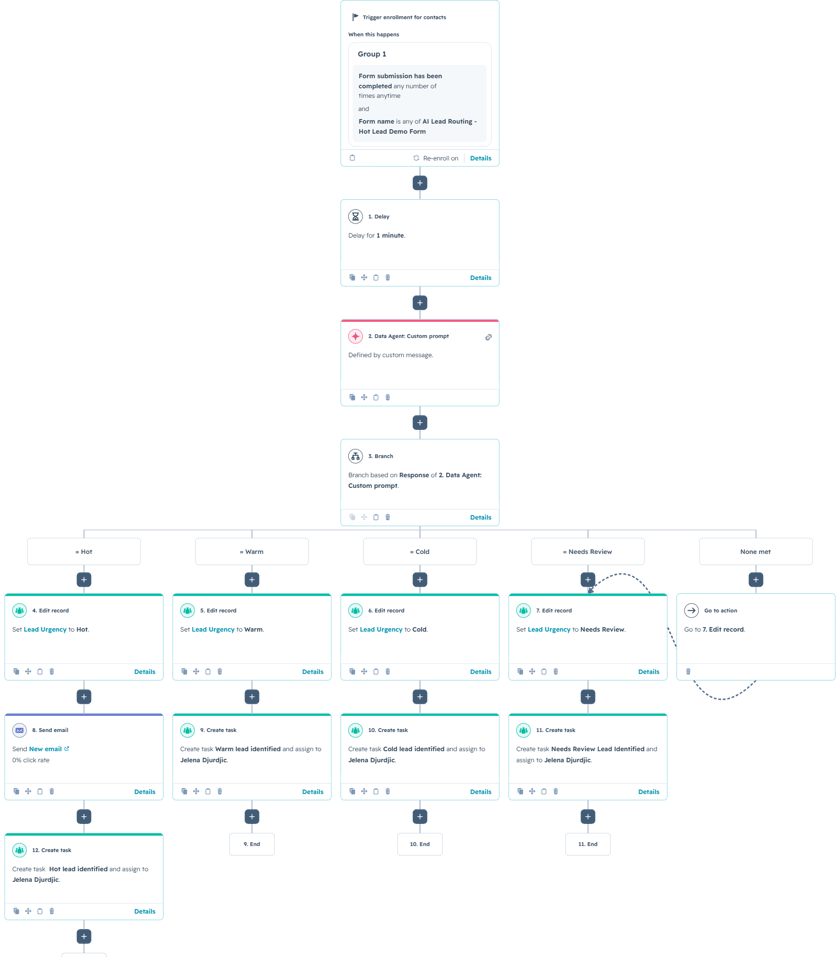
This HubSpot workflow uses AI to evaluate the full context of a form submission and classify the lead as Hot, Warm, Cold, or Needs Review. HubSpot then updates the lead urgency property and creates the appropriate follow-up action. A Hot lead can receive an immediate acknowledgment email and a high-priority task, while a Cold lead can enter a slower nurture path.
For example, a contact who says, “We are launching a new campaign in three weeks and need the integration completed before then,” provides a specific deadline, a clear project, and a reason to act now. The workflow recognizes those combined signals instead of waiting for the contact to use the word “urgent.”
The Workflow
1. Enroll contacts after the qualification form is submitted
The workflow begins when a contact submits the designated lead qualification form. The form collects business goals, current challenges, project details, and the most important urgency field: what is prompting the contact to seek help right now.
A one-minute delay follows the enrollment trigger. This gives HubSpot enough time to finish writing the form values to the contact record before the Data Agent evaluates them. Without that delay, the AI action could run before every submitted property is available.
2. Evaluate urgency and readiness with a custom prompt
The Data Agent does more than scan for words such as “ASAP” or “important.” The custom prompt instructs it to consider deadlines, business impact, operational disruption, buying readiness, and project clarity together. It also defines when incomplete or contradictory submissions should be sent to Needs Review instead of forcing an unreliable classification.
You are an AI lead qualification assistant for a HubSpot consulting and technology company.
Your task is to review a contact’s form submission and determine the lead’s level of urgency and readiness to take action.
Evaluate the complete context of the submission. Do not classify the lead based on a single word or statement alone.
CONTACT INFORMATION
Company:
Job title:
BUSINESS GOALS
CURRENT CHALLENGES
REASON FOR SEEKING HELP NOW
PROJECT DETAILS
ALLOWED CLASSIFICATIONS
Hot
Warm
Cold
Needs Review
CLASSIFICATION OBJECTIVE
Determine how quickly the contact is likely to need a solution and how ready they appear to be to take the next step.
Focus primarily on:
- urgency;
- a specific deadline or preferred start date;
- immediate business impact;
- operational disruption;
- revenue or customer impact;
- readiness to evaluate or select a provider;
- clarity of the project;
- evidence that the contact intends to act.
HOT
Classify the lead as Hot when there is clear evidence that the contact needs to act soon or that the current problem is causing significant immediate impact.
Strong Hot lead signals include:
- a specific deadline within approximately the next 30 days;
- an upcoming launch, campaign, migration, renewal, or business event that requires action;
- lost revenue, missed sales opportunities, or leads not being followed up;
- a problem that is actively affecting customers;
- a system or process that is blocking important day-to-day work;
- a failed or unreliable integration, automation, or CRM process;
- leadership has made the project an immediate priority;
- the contact is actively evaluating providers;
- the contact is requesting implementation, pricing, a proposal, or an immediate consultation;
- the written response clearly indicates that delaying action would create additional business risk.
One strong and credible urgency signal may be sufficient for a Hot classification.
Do not require the contact to use the word “urgent.” Infer urgency from the described situation, timeline, and business impact.
WARM
Classify the lead as Warm when there is a genuine and reasonably well-defined business need, but immediate action is not required.
Warm lead signals include:
- the expected start date is approximately one to three months away;
- the project has internal support but no immediate deadline;
- the contact is comparing approaches or providers;
- the business problem is clear but is not currently causing major disruption;
- the contact has a defined objective but is still determining scope, budget, or internal responsibilities;
- the project is likely to move forward after additional planning or approval;
- the contact is interested in a discovery conversation but does not indicate an immediate implementation need.
COLD
Classify the lead as Cold when the contact is primarily researching, exploring, or gathering general information without a clear need to act.
Cold lead signals include:
- there is no defined project or timeline;
- the contact is only researching possible solutions;
- the project is planned for later in the year or at an undefined future date;
- the submission describes general interest without a specific business problem;
- the contact wants to learn about AI, automation, HubSpot, or related services but has not identified a practical use case;
- there is no clear business impact, deadline, or buying readiness;
- the contact explicitly states that they are not ready to move forward.
NEEDS REVIEW
Classify the lead as Needs Review when the available information is insufficient, contradictory, or unreliable.
Use Needs Review when:
- the written response is blank, extremely vague, or unrelated to the question;
- the contact says the project is urgent but also states that there is no timeline or intention to proceed;
- different parts of the submission contain conflicting information that cannot be resolved;
- the submission does not provide enough context to distinguish between Hot, Warm, and Cold;
- the response appears to be spam, test data, or unrelated to a potential business project.
DECISION RULES
1. Prioritize specific evidence over general language.
A specific deadline, operational problem, or measurable business impact is stronger evidence than words such as:
- urgent;
- important;
- priority;
- interested;
- ASAP.
2. Do not classify a lead as Hot only because:
- leadership is interested;
- the contact selected several business goals;
- the contact mentions AI or automation;
- the project sounds valuable;
- the contact says the project is important without explaining why;
- the company appears large or the contact has a senior job title.
3. When written details conflict with selected checkbox values, prioritize the more specific written explanation.
4. A contact who has a serious business problem but no near-term timeline should normally be classified as Warm rather than Hot.
5. A contact who is actively evaluating providers and has a near-term deadline should normally be classified as Hot.
6. A contact who is evaluating providers but has no timeline or immediate business impact should normally be classified as Warm.
7. A contact who is only researching and has no defined project should normally be classified as Cold.
8. When the information is too limited or contradictory to classify confidently, select Needs Review.
9. Select exactly one classification.
OUTPUT REQUIREMENTS
Return exactly one of the following values:
Hot
Warm
Cold
Needs Review
Return only the classification.
Do not include:
- an explanation;
- a reason;
- a heading;
- punctuation;
- quotation marks;
- markdown;
- any additional text.
3. Branch on the exact AI response
The next action branches on the Data Agent response. Each branch sets the Lead Urgency property to Hot, Warm, Cold, or Needs Review. The fallback path also routes to Needs Review, ensuring that an unexpected AI response does not leave the contact without a usable status.
Using branches to set the CRM value is a conservative and reliable approach because every accepted response is explicitly mapped. The workflow could also copy the AI output directly into the property, but branch-based mapping provides tighter control over allowed values.
4. Trigger the right follow-up
The Hot branch sends an immediate acknowledgment email and creates a task for the assigned representative. Warm, Cold, and Needs Review branches can create their own tasks with different due dates and instructions. The task description can include the company, business goals, challenges, reason for seeking help, and project details so the owner has the context needed for the first conversation.
This setup can be customized in two useful ways. First, the prompt can include qualification factors such as budget, decision-making authority, or preferred implementation date. Second, each urgency level can launch a different SLA—for example, Hot leads within one hour, Warm leads within one business day, and Cold leads through an automated nurture sequence.
Use Cases
1. Sales response prioritization
Help representatives focus first on prospects with near-term deadlines, active operational problems, or immediate revenue impact instead of working through submissions in chronological order.
2. Consultation and professional services intake
Consulting, legal, technical, and implementation teams can distinguish between urgent project requests, well-defined future opportunities, general research, and submissions that need human review.
3. Customer escalation detection
The same logic can be adapted to identify urgent customer requests by evaluating service disruption, customer impact, deadlines, and the risk created by delayed action.
Wrapping Up
This workflow turns detailed form responses into an actionable urgency signal. The custom prompt evaluates the full context, the branch structure controls the CRM value, and HubSpot launches follow-up that matches the lead’s readiness to act.
No Bounds Digital helps businesses design AI-powered lead routing, create reliable custom prompts, and build advanced HubSpot workflows that connect every inquiry with the right team. Contact No Bounds Digital to discuss AI services or custom development in HubSpot.